1、agno 初识
很早之前有接触过 agno, 当时它主要宣传的编译快,启动运行快,比 langgraph 快多少多少倍,但是那时 agno 并没有 workflow 功能,所以选型的时候也就没有在考虑范围,今天看它的文档,发现已经有了 workflow 功能,且常见的条件,循环,并行,迭代功能都有,于是来了兴趣,想要系统的学习一下。
简介
Agno 是一个非常快速的多智能体框架、运行时和控制平面。它提供了一个统一的堆栈,用于构建、运行和管理多智能体系统,包括:
- 框架:使用记忆、知识、状态、人在回路(HITL)、上下文压缩、MCP 等特性来构建智能体、多智能体团队和工作流
- AgentOS 运行时:通过安全无状态的运行时和现成可用的集成端点来运行您的多智能体系统。
- AgentOS 控制平面:测试、监控和管理不同环境中的 AgentOS 部署,并具有完整的操作可见性。
Agno 提供了完整的解决方案,用于构建智能体系统,其中包括最快的框架以创建智能体、团队和流程;一个现成可使用的 FastAPI 应用程序,让您在第一天就能开始构建 AI 产品;以及一个控制平面,用于测试、监控和管理系统。Agno 带来了其他框架没有提供的新颖架构,您的 AgentOS 可以安全地运行在您的云中,而控制平面则直接从浏览器连接到它。您不需要向任何外部服务发送数据或支付保留费用,您可以获得完全的隐私和控制权。
构建agent
安装 agno 以及相关的库
uv add agno mcp 'fastapi[standard]' sqlalchemy openai
创建一个 start.py 文件, 写入以下代码
# -*- coding: utf-8 -*-
import os

from agno.agent import Agent
from agno.models.openai import OpenAILike
from agno.os import AgentOS
from agno.db.sqlite import SqliteDb

# Create the Agent
agno_agent = Agent(
    name="Agno Agent",
    model=OpenAILike(
        api_key=os.getenv("OPENAI_API_KEY"),
        id="qwen-max"
    ),
    # Add a database to the Agent
    db=SqliteDb(db_file="agno.db"),
    # Add the previous session history to the context
    add_history_to_context=True,
    debug_level=2,
    markdown=True,
)


# 创建一个 AgentOS
agent_os = AgentOS(agents=[agno_agent])
# 创建一个 Fastapi 应用
app = agent_os.get_app()
创建 .env 文件,用于写入程序中的各种 key
OPENAI_API_KEY=xxxxx
OPENAI_BASE_URL=https://dashscope.aliyuncs.com/compatible-mode/v1
这里遇到一个问题,最开始我使用的是 agno.models.openai.OpenAIChat 模型类,模型使用的是阿里的千问,我觉得阿里的千问是 openai 兼容的,想着只要修改一下 base_url 就行了,但是不行,上来就报错,
developer is not one of ['system‘, 'assistant', 'user', 'tool', 'function']
这个是由于OpenAIChat 类有个默认的角色转换 map, 会将 system 的消息转换为 developer, 千问平台又不支持 developer 的 role 消息,所以就报错了
default_role_map = {
    "system": "developer",
    "user": "user",
    "assistant": "assistant",
    "tool": "tool",
    "model": "assistant",
}
之后我使用 OpenAILike,这个类是继承子 OpenAIChat 类,但是它的default_role_map 没有做替换。
agno agent 运行
启动本地服务
uv run --env-file .env uvicorn start:app --reload
这条命令会在本地启动一个fastapi 服务,监听端口是 8000, 我们可以通个这个 api 服务调用agent 服务,可以访问 http://127.0.0.1:8000/docs#/ 来查看文档,但是这里推荐一个更加简单方便的运行方式,使用agno 官方的 agentOS 来运行
agentOS 运行
访问 https://os.agno.com/ ,登录成功以后,点击顶部导航栏中的 Add new OS 。 ENDPOINT URL 填写 http://127.0.0.1:8000/, NAME 随便写一个
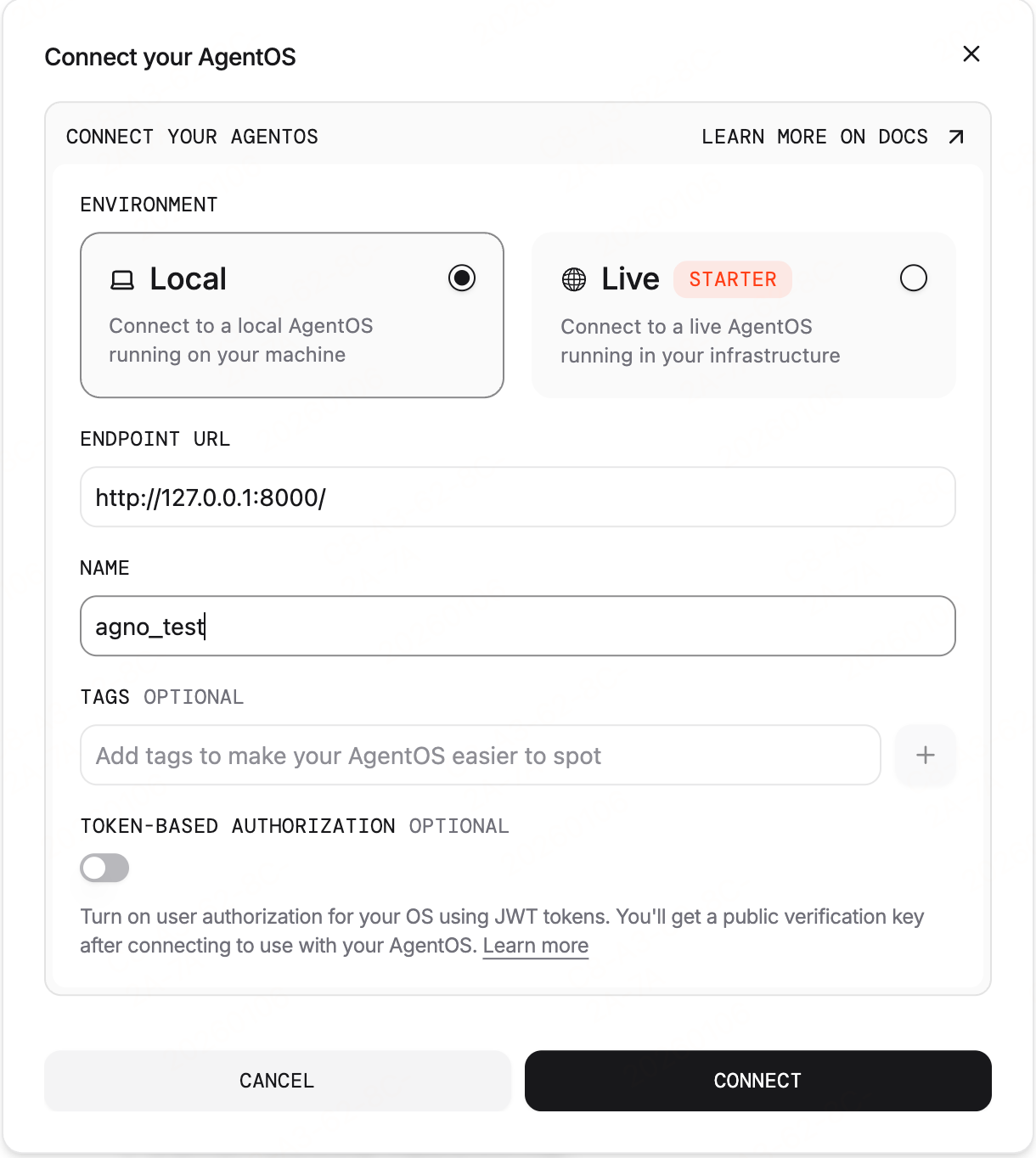
点击 connect 按钮进行连接,成功以后就可以在网页上进行对话了
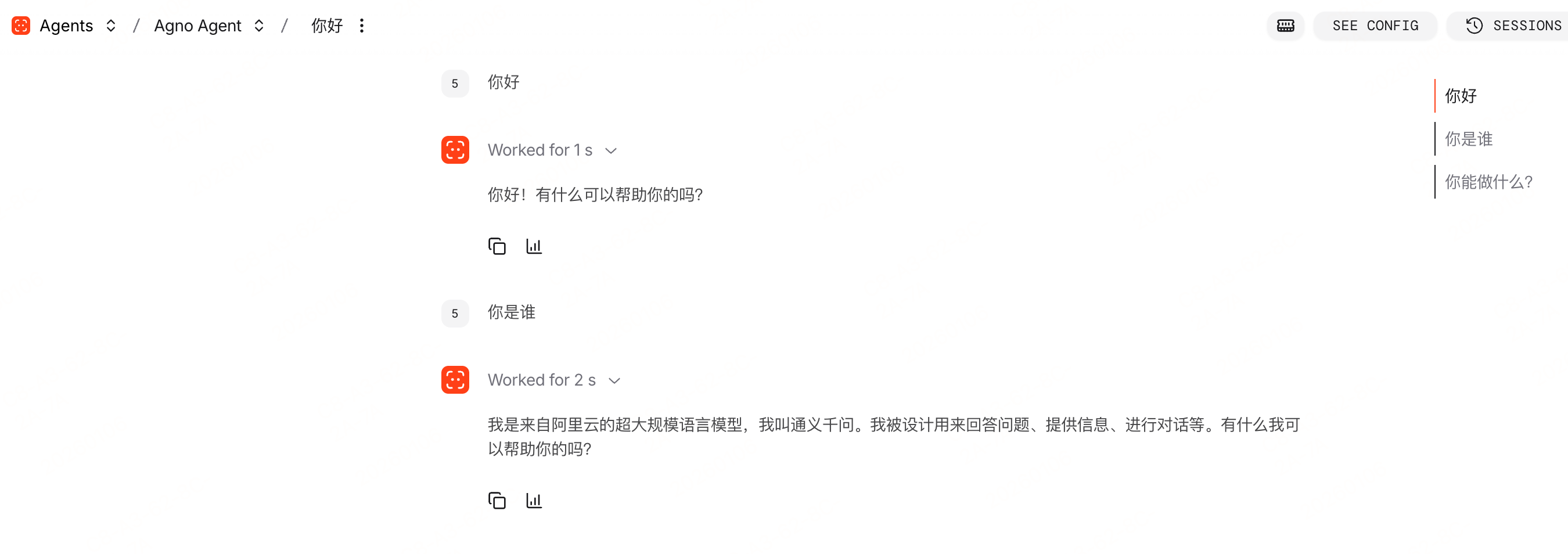
agentOS 的功能还是挺完善的,流式响应,消息历史,知识库,记忆系统等都可,可以很方便的调试 agno agent。
本地运行 run
如果访问 agno 有网络问题,我们可以本地运行 agent
# # 创建一个 AgentOS
# agent_os = AgentOS(agents=[agno_agent])
# # 创建一个 Fastapi 应用
# app = agent_os.get_app()

stream: Iterator[RunOutputEvent] = agno_agent.run("你好,你是谁?", stream=True)
for chunk in stream:
    if chunk.event == RunEvent.run_content:
        print(chunk.content)
将创建 fastapi 的代码注释掉,使用 agent.run 方法本地调用。
我觉得还是使用 agentOS 运行的方式更加好用,强烈推荐使用 agentOS 方式。
工具使用
没有工具的 agent 就不是 agent,agno agent 也可以绑定工具, agno 的工具可以是普通的 python 函数,也可以是继承 Toolkits 的实现类
python 函数
定义工具函数, 这里不写真实的 api 请求,只是简单的返回一些假数据
def get_weather(city: str) -> str:
    """
    返回城市 city 的天气信息.

    Args:
    city (str): 想要获取天气信息的城市名称.
    """
    # In a real implementation, this would call a weather API
    weather_conditions = ["晴", "多云", "有雨", "有雪", "有风"]
    random_weather = random.choice(weather_conditions)

    return f"{city} 的天气是 {random_weather}."
agentOS 中可以详细的展示
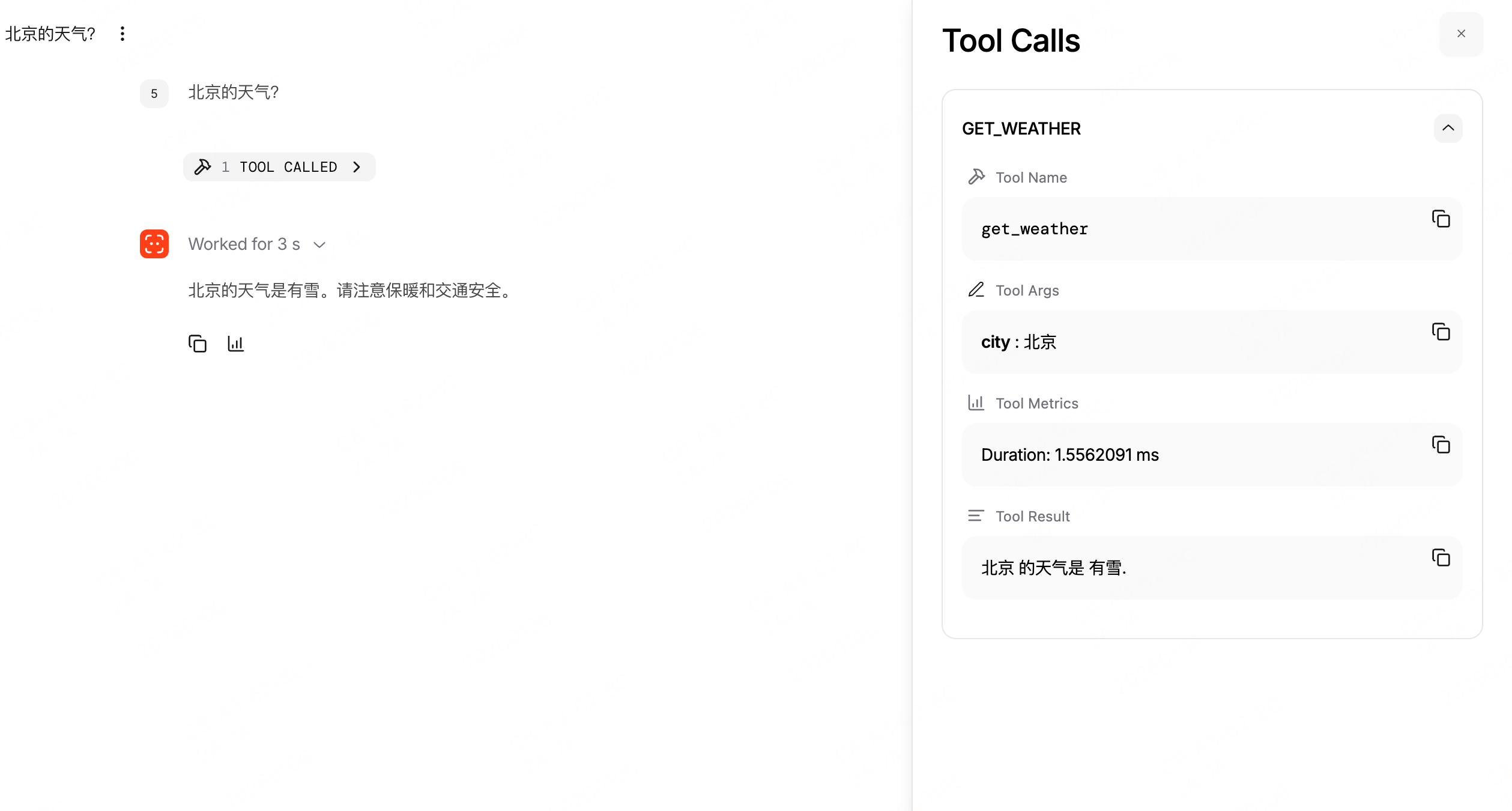
工具传递给大模型的信息
{
  "tools": [
    {
      "type": "function",
      "function": {
        "name": "get_weather",
        "description": "返回城市 city 的天气信息.\n参数:\n    city (str): 想要获取天气信息的城市名称.",
        "parameters": {
          "type": "object",
          "properties": {
            "city": {
              "type": "string"
            }
          },
          "required": [
            "city"
          ]
        }
      }
    }
  ]
}
这里给大模型的工具信息中没有参数,所有的参数都写在了description,我还是希望可以明确的将函数参数说明带到大模型中,这里可以使用 pydantic.BaseModel 来定义参数
class GetWeatherRequest(BaseModel):
    city: str = Field(description="The city to get the weather for")
    day_type: int = Field(default=1, description="The type of day, 0 for today, 1 for tomorrow, etc.")

def get_weather(request: GetWeatherRequest) -> str:
    """
    返回城市 city 的天气信息.
    """
    # In a real implementation, this would call a weather API
    weather_conditions = ["晴", "多云", "有雨", "有雪", "有风"]
    random_weather = random.choice(weather_conditions)

    return f"{request.city} 的天气是 {random_weather}."
上面带到大模型的工具参数为
{
  "tools": [
    {
      "type": "function",
      "function": {
        "name": "get_weather",
        "description": "返回城市 city 的天气信息.",
        "parameters": {
          "type": "object",
          "properties": {
            "request": {
              "properties": {
                "city": {
                  "description": "The city to get the weather for",
                  "title": "City",
                  "type": "string"
                },
                "day_type": {
                  "default": 1,
                  "description": "The type of day, 0 for today, 1 for  \n      tomorrow, etc.",
                  "title": "Day Type",
                  "type": "integer"
                }
              },
              "required": [
                "city"
              ],
              "title": "GetWeatherRequest",
              "type": "object"
            }
          },
          "required": [
            "request"
          ]
        }
      }
    }
  ]
}
看到此时 city 参数的 description 已经可以明确的定义了
 {
	 "city": {
	  "description": "The city to get the weather for",
	  "title": "City",
	  "type": "string"
	}
}
没有使用 BaseModel 定义的只有类型信息,这种需要在函数的注释中详细的写明参数信息
{
	"city": {
	  "type": "string"
	}
}
不过我看 agno 提供的内置工具还有官方文档,基本上都是使用注释的方式,所以之后也优先使用这种方式吧。
Toolkits
官方提供了一系列的内置工具,可以访问 https://docs.agno.com/integrations/toolkits/overview 查看,这里很多工具国内也用不了,不过发现有个 baidusearch 的工具,试一下
需要安装两个库
uv add pycountry baidusearch
我这里还是将之前的 get_weather 保留,看模型是否可以自动选择
from agno.tools.baidusearch import BaiduSearchTools

agno_agent = Agent(
    name="Agno Agent",
    model=OpenAILike(
        api_key=os.getenv("OPENAI_API_KEY"),
        id="qwen-max"
    ),
    tools=[get_weather, BaiduSearchTools()],
    db=SqliteDb(db_file="agno.db"),
    add_history_to_context=True,
    debug_level=2,
    markdown=True,
)
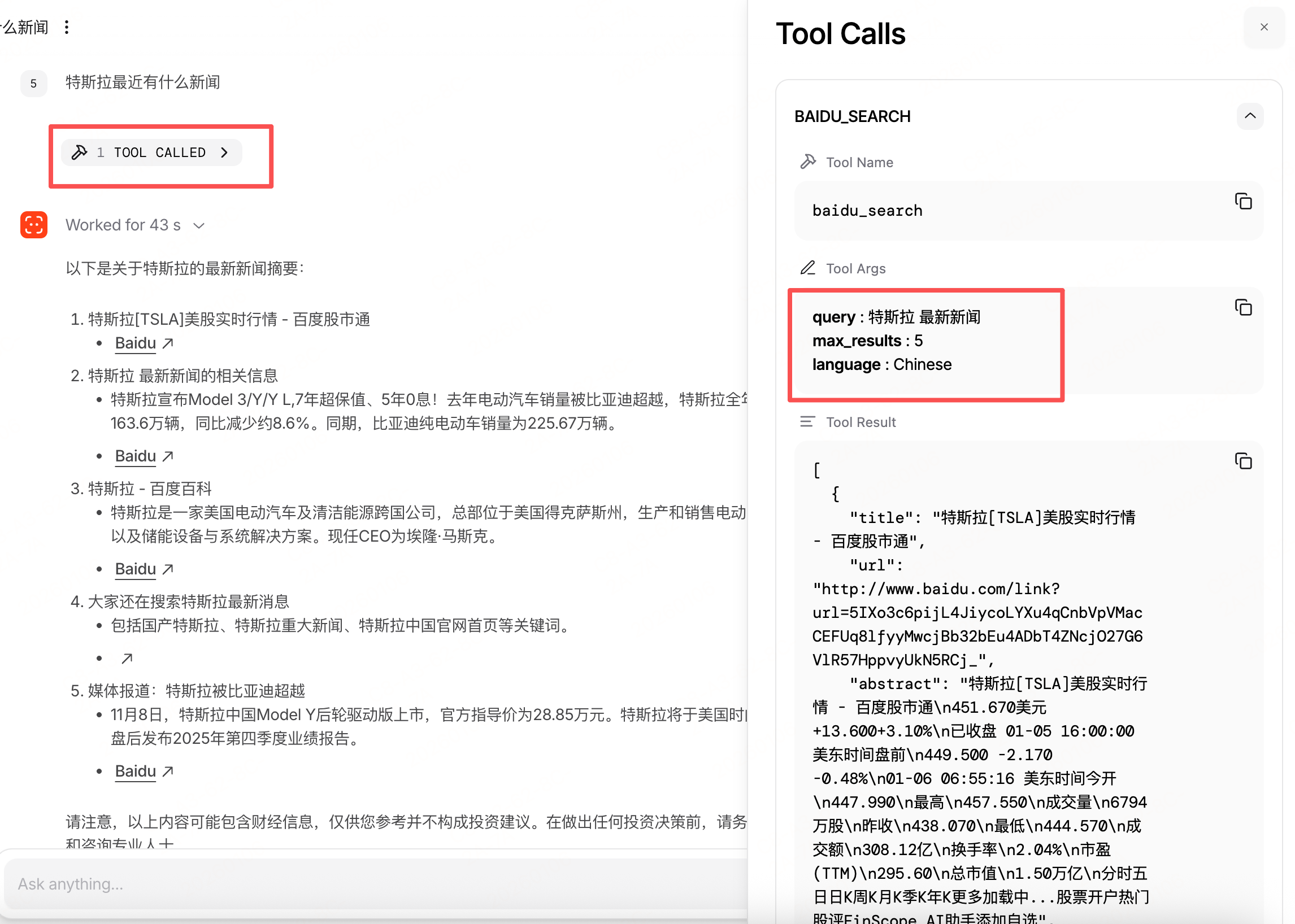
我问 “特斯拉最近有什么新闻”, agno 可以正常的调用 baidu_search 工具。
MCP 工具
agno 还支持 MCP 工具,官方文档中有个关于 agno 文档的搜索 MCP 工具
from agno.tools.mcp import MCPTools

agno_doc_tool = MCPTools(transport="streamable-http", url="https://docs.agno.com/mcp")

agno_agent = Agent(
    name="Agno Agent",
    model=OpenAILike(
        api_key=os.getenv("OPENAI_API_KEY"),
        id="qwen-max"
    ),
    tools=[get_weather, agno_doc_tool, BaiduSearchTools()],
    db=SqliteDb(db_file="agno.db"),
    add_history_to_context=True,
    debug_level=2,
    markdown=True,
)
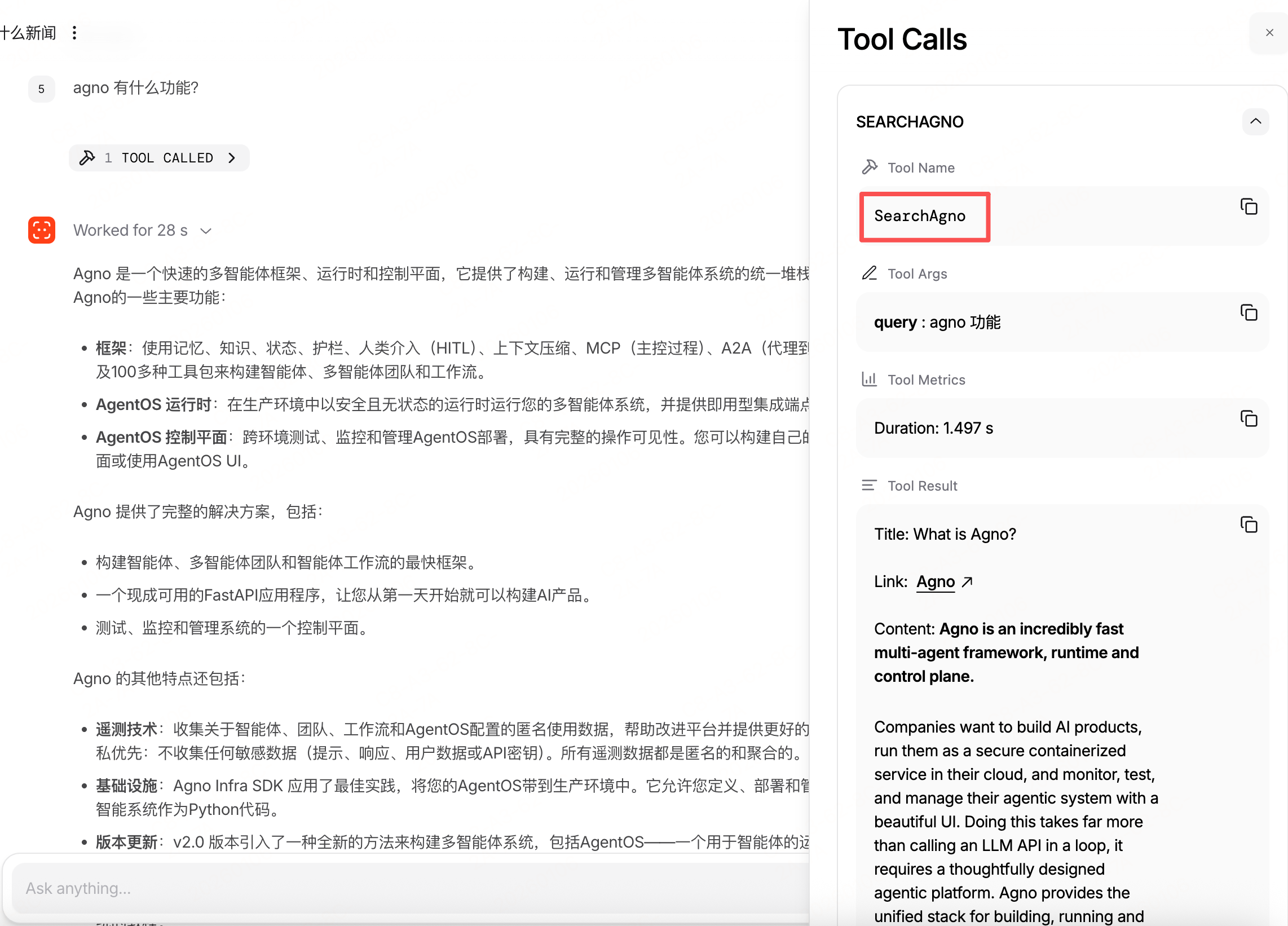
我将之前的 baidu 搜索和天气查询都保留着, 看看大模型能不能正确的分析,我向 agent 提问 “agno 有什么功能?”
可以看到正确的执行了 MCP 工具。
查看这个MCPTools 的定义,三种主要的transport 都是支持的
transport: Literal["stdio", "sse", "streamable-http"] = "stdio"
总结
本文介绍了 agno 最基础的使用,也算是初识吧,它的 agentOS 使用体验不错,下一篇准备看一在组队 Teams 的使用。